# Index & Document
ES 作为一个索引及搜索服务,对外提供丰富的 RESTful 接口。如下示例使用 Kibana 操作,PostMan 同理。
# Dev 和 Ops 视角
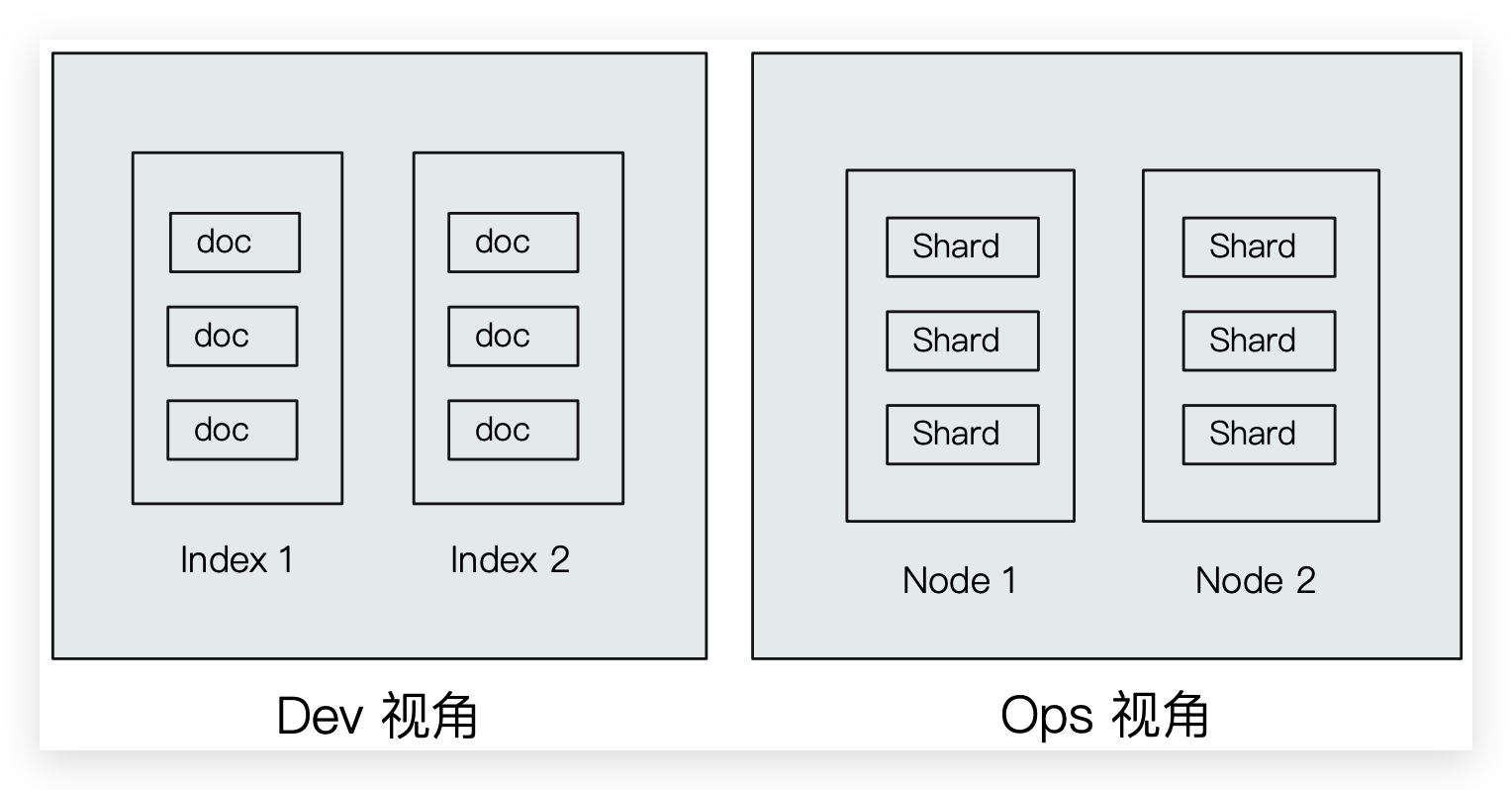
Index 索引
Type 类型- Document 文档
Node 节点
- Shard 分片
# Index
- Index 是 Document 的容器,是同一类(7.0 之后只允许为
_doc) Document 的集合。 - Index 体现了逻辑空间的概念,与 Node 体现物理空间不同
- Index 就相当于 RDBMS 中的表,或相当于 Mongodb 中的集合
- Index 包括了分词列表及文档列表
- 每个 Index 都有自己的 mapping 定义,用于定义包含的 Document 的 Field 名称 和 Field 类型。不定义 mapping 直接插入 Document 时 ES 会自动判断 Field 类型并生成。setting 同理也会自动生成。
思考
创建索引库相当于关系数据库中的数据库还是表?
如果相当于数据库就表示一个索引库可以创建很多不同类型的文档,这在ES中也是允许的(但是 7.0 之后不允许!)
如果相当于表就表示一个索引库只能存储相同类型的文档,ES官方建议在一个索引库中只存储相同类型的文档
RDBMS ES Table Index(Type) Row Document Column Field Schema Mapping SQL DSL
Index 的不同语义
Indexing (动词)Document 到 ES 的 Index(名词)中
- 名词:一个 ES 集群中,可以创建很多个不同的 Index
- 动词:保存一个 Document 到 ES 的过程也称作 Indexing(ES 创建一个倒排 Index 的过程)
- 名词:一个 B 树 Index,一个倒排 Index
# 查询
# 查询 index 的信息,包括 setting 和 mapping
GET /<index>
# 创建
综合 setting 和 mapping
PUT /<index>
{
    "settings":{
        "index":{
            "number_of_shards":1,
            "number_of_replicas":0
        }
    },
    "properties": {
        "description": {
            "type": "text",
            "analyzer": "ik_max_word",
            "search_analyzer": "ik_smart"
        },
        "name": {
            "type": "text",
            "analyzer": "ik_max_word",
            "search_analyzer": "ik_smart"
        },
        "pic":{
            "type":"text",
            "index":false
        },
        "price": {
            "type": "float"
        },
        "studymodel": {
            "type": "keyword"
        },
        "timestamp": {
            "type": "date",
            "format": "yyyy‐MM‐dd HH:mm:ss||yyyy‐MM‐dd||epoch_millis"
        }
    }
}
# 只可删除 index
DELETE /<index>
删除 Index 的同时会删除该 Index 下的所有 setting、mapping 和 Document
# 无法修改,只能迁移数据
映射创建成功可以添加新字段,已有字段不允许更新 type
# setting
setting 定义了不同的数据分布(索引的分片,副本)
# 查询
GET /<index>/_settings

# 查询所有 index 的 setting
GET /_settings
# 创建
注意
使用 PUT 是由于幂等;不能使用 POST 是由于非幂等且 POST 默认会添加 Document,同时设置 setting 和 mapping
PUT /<index>
{
    "settings":{
        "index":{
            "number_of_shards":1,
            "number_of_replicas":0
        }
    }
}
number_of_shards:设置分片的数量,在集群中通常设置多个分片,表示一个索引库将拆分成多片分别存储不同的结点,提高了ES的处理能力和高可用性,入门程序使用单机环境,这里设置为1。number_of_replicas:设置副本的数量,设置副本是为了提高 ES 的高可靠性,单机环境设置为0。
注意
ES6.0 之前的版本有 Type(类型)概念,相当于关系数据库的表,ES 官方将在 ES9.0 版本中彻底删除 Type
# 只可删除 index
DELETE /<index>
删除 Index 的同时会删除该 Index 下的所有 setting、mapping 和 Document
# 无法修改,只能迁移数据
# mapping
在 Index 中每个 Document 都包括了一个或多个 Field,创建 mapping 就是向Index(索引库)中创建 Field 并指定 Field 类型的过程。虽然 ES 会根据 Document 自动设置类型,但是有些 Field 需要自己手动设置!
# 查询
GET /<index>/_mapping

# 查询所有 index 的 mapping
GET /_mapping
# 创建
# 创建 Index 的 mapping
PUT /<index>
{
  "mappings": {
        "properties": {
            "name": {
                "type": "text"
            },
            "age": {
                "type": "integer"
            },
            "mail": {
                "type": "keyword"
            },
            "hobby": {
                "type": "text",
                "analyzer": "ik_max_word"
            }
        }
    }
}
# 添加新字段
映射创建成功后可以添加新字段
PUT /<index>/_mapping/_doc
{
	"properties": {
		"sex": {
			"type": "text"
		}
	}
}
# 已有字段不允许更新 Field
可以迁移数据,使用 Reindex 和 alias 完成
# 只可删除 index
DELETE /<index>
删除 Index 的同时会删除该 Index 下的所有 setting、mapping 和 Document
# 常用映射类型
# 字符串—text
index
通过index属性指定是否索引,默认为index=true,即要进行索引,只有进行索引才可以从索引库搜索到。
但是也有一些内容不需要索引,比如:商品图片地址只被用来展示图片,不进行搜索图片,此时可以将index设置为false
analyzer
通过analyzer属性指定分词器。下边指定name的字段类型为text,使用ik分词器的ik_max_word分词模式。
"name": {
    "type": "text",
    "analyzer":"ik_max_word"
}
search_analyzer
上边指定了analyzer是指在索引和搜索都使用ik_max_word,如果单独想定义搜索时使用的分词器则可以通过该属性
对于ik分词器建议是索引时使用**
ik_max_word将搜索内容进行细粒度分词,搜索时使用ik_smart**提高搜索精确性"name": { "type": "text", "analyzer":"ik_max_word", "search_analyzer":"ik_smart" }store
是否在source之外存储,默认为false。每个文档索引后会在 ES中保存一份原始文档,存放在"
_source"中,一般情况下不需要设置store为true,因为在_source中已经有一份原始文档了。
测试
手动删除xc_course/doc下的映射,即删除索引库,创建索引库
创建新映射:
Post http://localhost:9200/xc_course/doc/_mapping{ "properties": { "name": { "type": "text", "analyzer":"ik_max_word", "search_analyzer":"ik_smart" }, "description": { "type": "text", "analyzer":"ik_max_word", "search_analyzer":"ik_smart" }, "pic":{ "type":"text", "index":false }, "studymodel":{ "type":"text" } } }插入文档:
post http://localhost:9200/xc_course/doc/4028e58161bcf7f40161bcf8b77c0000{ "name":"Bootstrap开发框架", "description":"Bootstrap是由Twitter推出的一个前台页面开发框架,在行业之中使用较为广泛。此开发框架包含了大量的CSS、JS程序代码,可以帮助开发者(尤其是不擅长页面开发的程序人员)轻松的实现一个不受浏览器限制的精美界面效果。", "pic":"group1/M00/00/01/wKhlQFqO4MmAOP53AAAcwDwm6SU490.jpg", "studymodel":"201002" }查询测试:
Get http://localhost:9200/xc_course/_search?q=name:java开发。也能搜到,会先搜索分词Get http://localhost:9200/xc_course/_search?q=description:开发Get http://localhost:9200/xc_course/_search? q=pic:group1/M00/00/01/wKhlQFqO4MmAOP53AAAcwDwm6SU490.jpgGet http://localhost:9200/xc_course/_search?q=studymodel:201002
【结论】name、description和studymodel都支持全文检索,pic不可作为查询条件
# 字符串—keyword
上边介绍的text文本字段在映射时要设置分词器,keyword字段为关键字字段,通常搜索keyword按照整体搜索精确匹配,所以创建keyword字段的索引时是不进行分词的,比如:邮政编码、手机号码、身份证等。keyword字段通常用于过虑、排序、聚合等
测试:
手动删除xc_course/doc下的映射,即删除索引库,创建索引库
创建新映射:
Post http://localhost:9200/xc_course/doc/_mapping{ "properties": { "name": { "type": "keyword" }, "description": { "type": "text", "analyzer":"ik_max_word", "search_analyzer":"ik_smart" }, "pic":{ "type":"text", "index":false }, "studymodel":{ "type":"keyword" } } }插入文档:
post http://localhost:9200/xc_course/doc/4028e58161bcf7f40161bcf8b77c0000{ "name": "java编程基础", "description": "java语言是世界第一编程语言,在软件开发领域使用人数最多。", "pic":"group1/M00/00/01/wKhlQFqO4MmAOP53AAAcwDwm6SU490.jpg", "studymodel": "201001" }根据studymodel查询文档:
get http://localhost:9200/xc_course/_search?q=name:javaname是keyword类型,所以查询方式是精确查询,全部匹配!!!
# 数值类型
下边是ES支持的数值类型
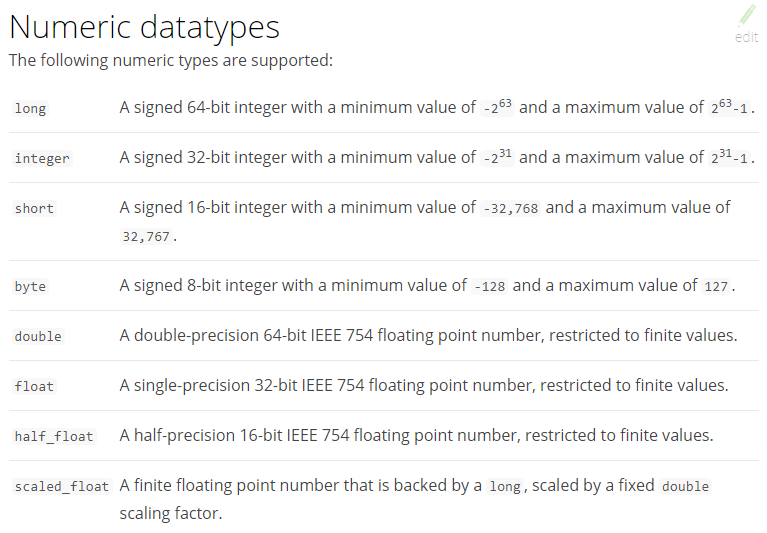
尽量选择范围小的类型,提高搜索效率(比如long类型别乱选)
对于浮点数尽量用比例因子,比如一个价格字段,单位为元,我们将比例因子设置为100这在ES中会按分存储,映射如下:
"price": {
    "type": "scaled_float",
    "scaling_factor": 100
},
由于比例因子为100,如果我们输入的价格是23.45则ES中会将23.45乘以100存储在ES中
如果输入的价格是23.456,ES会将23.456乘以100再取一个接近原始值的数,得出2346
使用比例因子的好处是整型比浮点型更易压缩,节省磁盘空间
如果比例因子不适合,则从下表选择范围小的去用:

# te 布尔值
- boolean
# date
日期类型不用设置分词器。通常用于排序。
- format:设置日期格式
测试
下边的设置允许date字段存储年月日时分秒、年月日及毫秒三种格式:
{
    "properties": {
        "timestamp": {
            "type": "date",
            "format": "yyyy‐MM‐dd HH:mm:ss||yyyy‐MM‐dd"
        }
    }
}
插入文档:
Post http://localhost:9200/xc_course/doc/3{ "name": "spring开发基础", "description": "spring 在java领域非常流行,java程序员都在用。", "studymodel": "201001", "pic":"group1/M00/00/01/wKhlQFqO4MmAOP53AAAcwDwm6SU490.jpg", "timestamp":"2018‐07‐04 18:28:58" }
# 二进制
- binary
# 综合例子
PUT /<index>/_doc/_mapping
{
    "properties": {
        "description": {
            "type": "text",
            "analyzer": "ik_max_word",
            "search_analyzer": "ik_smart"
        },
        "name": {
            "type": "text",
            "analyzer": "ik_max_word",
            "search_analyzer": "ik_smart"
        },
        "pic":{
            "type":"text",
            "index":false
        },
        "price": {
            "type": "float"
        },
        "studymodel": {
            "type": "keyword"
        },
        "timestamp": {
            "type": "date",
            "format": "yyyy‐MM‐dd HH:mm:ss||yyyy‐MM‐dd||epoch_millis"
        }
    }
}
# Type
- 在 7.0 之前,一个 Index 可以设置多个 Types
- 6.0 开始,Type 已经被 Deprecated。7.0 开始一个 Index 只能创建一个 Type:
_doc
# Document
- ES 是面向 Document 的,Document 是所有可搜索数据的最小单位
- 日志文件中的日志项
- 一本电影的具体信息;一张唱片的详细信息
- MP3 播放器里的一首歌;一篇 PDF 文档中的具体内容
- 一篇 Documemt 包含了一系列的 Field,类似数据库中表的一条记录
- Document 会被序列化成 JSON,保存在 ES 中
- JSON 对象由 Field 组成
- 每个 Field 都有对应的类型(字符串、数值、布尔、日期、二进制、范围类型)
- 每个 Document 都有一个 Unique ID
- 可以自己指定 ID
- 可以通过 ES 自动生成,32 位长度字符串
# 元数据
每一篇 Document 都有元数据,用于标注 Document 的相关信息
{
  "_index": "movies",
  "_type": "_doc",
  "_id": "2665",
  "_version": 1,
  "_score": 1,
  "_source": {
    "@version": "1",
    "title": "Earth vs. the Flying Saucers",
    "genre": [
      "Sci-Fi"
    ],
    "year": 1956,
    "id": "2665"
  }
}
- _index:Document 所属的 Index 名
- _type:Document 所属的 Type 名
- _id:文档的唯一 ID
- _version:Document 的版本信息,每次修改都会加一
- _score:相关性打分
- _source:文档的原始 JSON 数据
_all:整合所有 Field 内容到该字段。已被废除
# 创建
ES 中的文档相当于 RDBMS 中的一条记录
# 创建,如果不指定 id 值 ES 会自动生成ID(不推荐,影响 RESTful 语义)
POST /<index>/_doc
POST /<index>/_doc/<_id>
POST /<index>/_create/<_id>
{
  "name": "zhangsan11111",
  "age": 13,
  "mail": "11111@qq.com"
}
- 若不指定 ID 值 ES 会自动生成 ID
- 若 ID 已存在,则修改,且根据提供的数据修改,没有的 Field 则删除掉。不推荐,影响 RESTful 语义
# 修改(覆盖)
# 修改(全修改),若 ID 所在 Document 不存在,则创建
PUT /<index>/_doc/<_id>
{
  "name": "zhangsan11111",
  "age": 13,
  "mail": "11111@qq.com"
}
- 若指定的 ID 值所在 Document 不存在,则创建
- 删除并重新添加,指定同一 ID,Field 数量可能改变
# 修改(局部修改)🔥
POST /<index>/_update/<_id>
{
  "doc": {
    "name": "3232322",
    "age": 13,
    "mail": "11111@qq.com"
  }
}
- 当检测到 Document没有改变时,则 version 不会加一
# 删除
DELETE /<index>/_doc/<_id>
# _cat 查询
# 查询所有 Index
GET /_cat/indices

#==================================================================================================
green open movies                       ILYU9p8_TF-zQ0Dhv6g2lg 1 1 9743 0  2.7mb    1.3mb
green open kibana_sample_data_ecommerce e7UYtIrwTCueNbynAYtzKw 1 1 4675 0  9.6mb    4.8mb
green open .kibana_task_manager_1       GKq_Aw38S_2Ds3A69S-OGQ 1 1    2 1 17.9kb   10.8kb
green open my_index                     yIAGPwWLSbi24XluT-hQ5w 1 0    0 0   283b     283b
green open itcast                       YmdieZ30TNOiScO83pRF2g 1 1    2 2 18.5kb    7.3kb
green open .apm-agent-configuration     2wojrVAESi6IBQC1ljromQ 1 1    0 0   566b     283b
green open .kibana_1                    wzLuski5Q7CFPUnSNhia2A 1 1   74 8  1.9mb 1003.4kb
# 根据 Index name 查询
GET /_cat/indices/<index>

#==================================================================================================
green open my_index yIAGPwWLSbi24XluT-hQ5w 1 0 0 0 283b 283b
# Reindex & alias 迁移数据
Reindex:
将文档从一个索引复制到另一个索引。
Reindex 要求为源索引中的所有文档启用
_source。您必须在调用
_reindex之前设置目标索引。 重新索引不会从源索引复制设置。 映射,分片计数,副本等必须提前配置。
alias:
- 通过 alias 来切换索引,因为 alias 中的多条命令是原子性
步骤:
查询 source index,据此修改
GET /<index>创建 dest index(7.0 后和 7.0 之前有些许区别,自己查文档)
PUT /<index>
{
  "settings": {
    "index": {
      "number_of_shards": "1",
      "number_of_replicas": "0"
    }
  },
  "properties": {
    "docContent": {
      "analyzer": "ik_max_word",
      "type": "text"
    },
    "docName": {
      "analyzer": "ik_max_word",
      "type": "text"
    },
    "fuseEeason": {
      "analyzer": "ik_max_word",
      "type": "text"
    },
    "appliedScope": {
      "analyzer": "ik_max_word",
      "type": "text"
    },
    "docNumber": {
      "analyzer": "ik_max_word",
      "type": "text"
    },
    "exeDate": {
      "analyzer": "ik_max_word",
      "type": "text"
    },
    "departName": {
      "analyzer": "ik_max_word",
      "type": "text"
    },
    "fileSuffix": {
      "type": "text"
    },
    "favType": {
      "type": "text"
    }
  }
}
_reindex 复制索引数据
POST _reindex
{
  "source": {
    "index": "index-v1"
  },
  "dest": {
    "index": "index-v2"
  }
}
alias 切换,之后查询的索引还是 index(别名)
POST _aliases
{
  "actions": [
    {
      "add": {
        "index": "index_v2",
        "alias": "index"
      }
    },
    {
      "remove_index": {
        "index": "index"
      }
    }
  ]
}