# Thymeleaf
# 模板引擎

Thymeleaf 是一个跟 Velocity、FreeMarker 类似的模板引擎,它可以完全替代 JSP 。相较与其他的模板引擎,它有如下三个特点
- Thymeleaf 在有网络和无网络的环境下皆可运行,即它可以让美工在浏览器查看页面的静态效果,也可以让程序员在服务器查看带数据的动态页面效果。这是由于它支持 html 原型,然后在 html 标签里增加额外的属性来达到模板 + 数据的展示方式。浏览器解释 html 时会忽略未定义的标签属性,所以 thymeleaf 的模板可以静态地运行;当有数据返回到页面时,Thymeleaf 标签会动态地替换掉静态内容,使页面动态显示。
- Thymeleaf 开箱即用的特性。它提供标准和 Spring 标准两种方言,可以直接套用模板实现 JSTL、 OGNL 表达式效果,避免每天套模板、改 JSTL、改标签的困扰。同时开发人员也可以扩展和创建自定义的方言。
- Thymeleaf 提供 Spring 标准方言和一个与 SpringMVC 完美集成的可选模块,可以快速的实现表单绑定、属性编辑器、国际化等功能。
如果希望以 Jar 形式发布模块则尽量不要使用 JSP 相关知识,这是因为 JSP 在内嵌的 Servlet 容器上运行有一些问题 (内嵌 Tomcat、 Jetty 不支持 Jar 形式运行 JSP,Undertow 不支持 JSP)。Spring Boot 提供了大量模板引擎,包括:
- FreeMarker
- Groovy
- Mustache
- Thymeleaf
- Velocity
- Beetl(国产)
# 引入
<dependency>
  <groupId>org.springframework.boot</groupId>
  <artifactId>spring-boot-starter-thymeleaf</artifactId>
</dependency>
<!--允许使用非严格的 HTML 语法。可以不添加该依赖-->
<dependency>
  <groupId>net.sourceforge.nekohtml</groupId>
  <artifactId>nekohtml</artifactId>
</dependency>
自动配置类如下:
@ConfigurationProperties(prefix = "spring.thymeleaf")
public class ThymeleafProperties {

    private static final Charset DEFAULT_ENCODING = Charset.forName("UTF-8");

    private static final MimeType DEFAULT_CONTENT_TYPE = MimeType.valueOf("text/html");

    public static final String DEFAULT_PREFIX = "classpath:/templates/";

    public static final String DEFAULT_SUFFIX = ".html";

   // ......
}
# 配置
# 在 application.yml 配置 Thymeleaf
spring:
  thymeleaf:
    cache: false # 开发时关闭缓存,不然没法看到实时页面
    mode: HTML # 用非严格的 HTML
    encoding: UTF-8
    servlet:
      content-type: text/html
# Hello World
只要我们把HTML页面放在/templates,thymeleaf就能自动渲染。在 IDEA 中输入 html:5并按下 Tab 键即可生成如下。还需添加 xmlns:th
<html lang="en" xmlns:th="http://www.thymeleaf.org"> <!--导入thymeleaf的名称空间,才能有语法提示-->
<head>
    <meta charset="UTF-8">
    <meta name="viewport"
          content="width=device-width, user-scalable=no, initial-scale=1.0, maximum-scale=1.0, minimum-scale=1.0">
    <meta http-equiv="X-UA-Compatible" content="ie=edge">
    <title>Document</title>
</head>
<body>
    <span th:text="${hello}"></span>

</body>
</html>
@Controller
public class ThymeleafController {

    @GetMapping("/hello/thymeleaf")
    public String helloThymeleaf(Model model){
        model.addAttribute("hello","helloThymeleaf");
        return "index";
    }
}
# 语法
th:text:改变当前元素里面的文本内容,转移特殊字符。th:utext不转义。th:任意html属性:来替换原生属性的值。th:each:遍历<tr th:each="p : ${pageInfo.list}"> <td th:text="${p.id}"></td> <td th:text="${p.name}"></td>
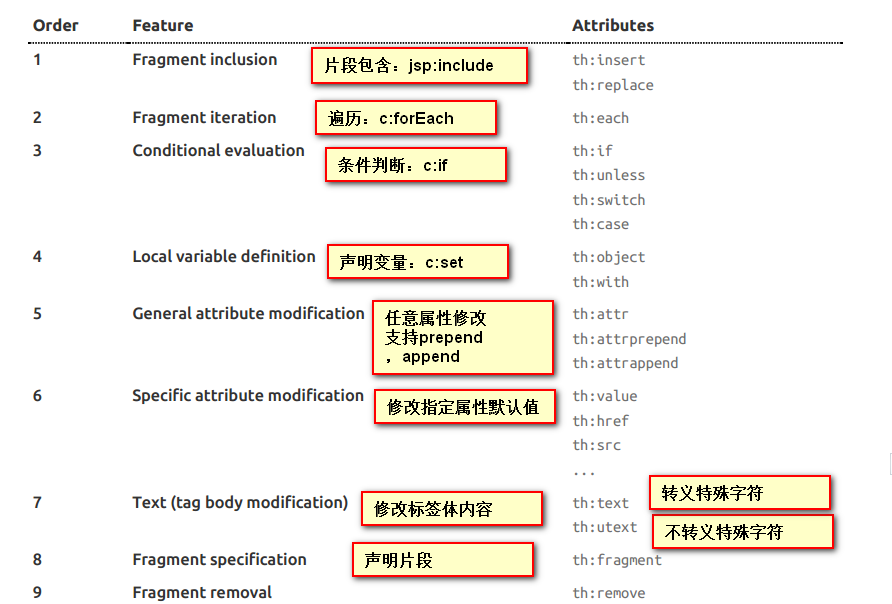
上图有优先级顺序
Simple expressions:(表达式语法)
Variable Expressions:
${...}:获取变量值;底层是OGNL;- 获取对象的属性、调用方法。
- 使用内置的基本对象:
${#ctx}: the context object.${#vars}: the context variables.${#locale}: the context locale. 如${#locale.country}${#request}: (only in Web Contexts) the HttpServletRequest object.${#response}: (only in Web Contexts) the HttpServletResponse object.${#session}#session : (only in Web Contexts) the HttpSession object.${#servletContext}: (only in Web Contexts) the ServletContext object.
- 使用内置的工具对象(同上,放在
${...}里):#execInfo: information about the template being processed.#messages: methods for obtaining externalized messages inside variables expressions, in the same way as they would be obtained using #{…} syntax.#uris: methods for escaping parts of URLs/URIs#conversions: methods for executing the configured conversion service (if any).#dates: methods for java.util.Date objects: formatting, component extraction, etc.#calendars: analogous to #dates , but for java.util.Calendar objects.#numbers: methods for formatting numeric objects.#strings: methods for String objects: contains, startsWith, prepending/appending, etc.#objects: methods for objects in general.#bools: methods for boolean evaluation.#arrays: methods for arrays.#lists: methods for lists.#sets: methods for sets.#maps: methods for maps.#aggregates: methods for creating aggregates on arrays or collections.#ids: methods for dealing with id attributes that might be repeated (for example, as a result of an iteration).
Selection Variable Expressions:
*{...}:选择表达式:和${...}在功能上是一样;配合th:object使用如下:<div th:object="${session.user}"> <p>Name: <span th:text="*{firstName}">Sebastian</span>.</p> <!--${session.user.firstName}--> <p>Surname: <span th:text="*{lastName}">Pepper</span>.</p> <!--${session.user.lastName}--> <p>Nationality: <span th:text="*{nationality}">Saturn</span>.</p> <!--${session.user.nationality}--> </div>Message Expressions:
#{...}:获取国际化内容Link URL Expressions:
@{...}:定义URL;在需要参数时,放在()里。<li><a href="" th:href="@{/user}" aria-label="Previous">首页</a></li> <li><a href="" th:href="@{/user(pageNum=${pageInfo.pageNum}-1)}">上一页</a></li> <li th:each="i:${#numbers.sequence(1,pageInfo.pages)}"><a href="" th:href="@{/user(pageNum=${i})}" th:text="${i}"></a></li> 暂时不会使用thymeleaf写页码 <li><a href="" th:href="@{/user(pageNum=${pageInfo.pageNum}+1)}">下一页</a></li> <li><a href="" th:href="@{/user(pageNum=${pageInfo.pages})}" aria-label="Next">尾页</a></li> 若使用Pagehelper,无需考虑越界 <form th:action="@{/user/}+${user.id}" method="POST"> <input type="hidden" name="_method" value="PUT"> <input type="hidden" name="id" th:value="${user.id}"> <input type="radio" th:name="sex" value="男" th:checked="${user.sex}=='男'?true:false"> </form> <script th:src="@{/plugins/bootstrap/js/bootstrap.min.js}"></script>Fragment Expressions:
~{...}:片段引用表达式Literals(字面量)
- Text literals: 'one text' , 'Another one!' ,…
- Number literals: 0 , 34 , 3.0 , 12.3 ,…
- Boolean literals: true , false
- Null literal: null
- Literal tokens: one , sometext , main ,…
Text operations:(文本操作)
- String concatenation: +
- Literal substitutions: |The name is ${name}|
Arithmetic operations:(数学运算)
- Binary operators: + , - , * , / , %
- Minus sign (unary operator): -
Boolean operations:(布尔运算)
- Binary operators: and , or
- Boolean negation (unary operator): ! , not
Comparisons and equality:(比较运算)
- Comparators: > , < , >= , <= ( gt , lt , ge , le )
- Equality operators: == , != ( eq , ne )
Conditional operators:条件运算(三元运算符)
- If-then: (if) ? (then)
- If-then-else: (if) ? (then) : (else)
- Default: (value) ?: (defaultvalue)
Special tokens:
- No-Operation: _
# 公共页面的抽取
1、抽取公共片段
<footer th:fragment="copy" id="footer1">
© 2011 The Good Thymes Virtual Grocery
</footer>
2、引入方式(每个templates下的html都是模板,其去掉后缀就是模板名)
~{templatename::selector}:模板名::选择器(CSS选择器)
~{templatename::fragmentname}:模板名::片段名
使用以下属性进行引入,可以不用写~{}
行内写法可以加上:[[~{}]];[(~{})];一个是转义,一个不转义
<div th:insert="footer :: copy"></div> <!--将公共片段整个插入到声明引入的元素中-->
<div th:replace="footer :: copy"></div> <!--将声明引入的元素替换为公共片段-->
<div th:include="footer :: copy"></div> <!--将被引入的片段的内容(只有内容)包含进这个标签中-->
<div th:include="footer :: #footer1"></div> <!--显示效果同include-->
效果
<div>
<footer>
© 2011 The Good Thymes Virtual Grocery
</footer>
</div>
<footer>
© 2011 The Good Thymes Virtual Grocery
</footer>
<div>
© 2011 The Good Thymes Virtual Grocery
</div>
引入片段的时候传入参数(动态显示高亮等用处):
<nav class="col-md-2 d-none d-md-block bg-light sidebar" id="sidebar">
    <div class="sidebar-sticky">
        <ul class="nav flex-column">
            <li class="nav-item">
                <a class="nav-link active"
                   th:class="${activeUri=='main.html'?'nav-link active':'nav-link'}"
                   href="#" th:href="@{/main.html}">
                    <svg xmlns="http://www.w3.org/2000/svg" width="24" height="24" viewBox="0 0 24 24" fill="none" stroke="currentColor" stroke-width="2" stroke-linecap="round" stroke-linejoin="round" class="feather feather-home">
                        <path d="M3 9l9-7 9 7v11a2 2 0 0 1-2 2H5a2 2 0 0 1-2-2z"></path>
                        <polyline points="9 22 9 12 15 12 15 22"></polyline>
                    </svg>
                    Dashboard <span class="sr-only">(current)</span>
                </a>
            </li>

<!--引入侧边栏;传入参数-->
<div th:replace="commons/bar::#sidebar(activeUri='emps')"></div>